2.03 Taints and Tolerations
Taint (on Node): says “don’t accept certain Pods unless they have permission.”
Toleration (on Pod): is that permission which allows the Pod to run on a tainted Node.
Key Point
- Taints keep Pods away from Nodes.
- Tolerations let Pods through, but don’t force them onto that Node.
- To force Pods onto specific Nodes, use Node Affinity.
- Remember: Taints are set on Nodes and Tolerations are set on Pods.
Taint Effects
Taints can have 3 different effects:
- NoSchedule → Pod without toleration will not be scheduled on the node.
- PreferNoSchedule → Kubernetes tries not to schedule Pods without toleration, but may still do so if needed.
- NoExecute → Pod without toleration will be evicted if it’s already running, and new Pods without toleration won’t be scheduled.
Example
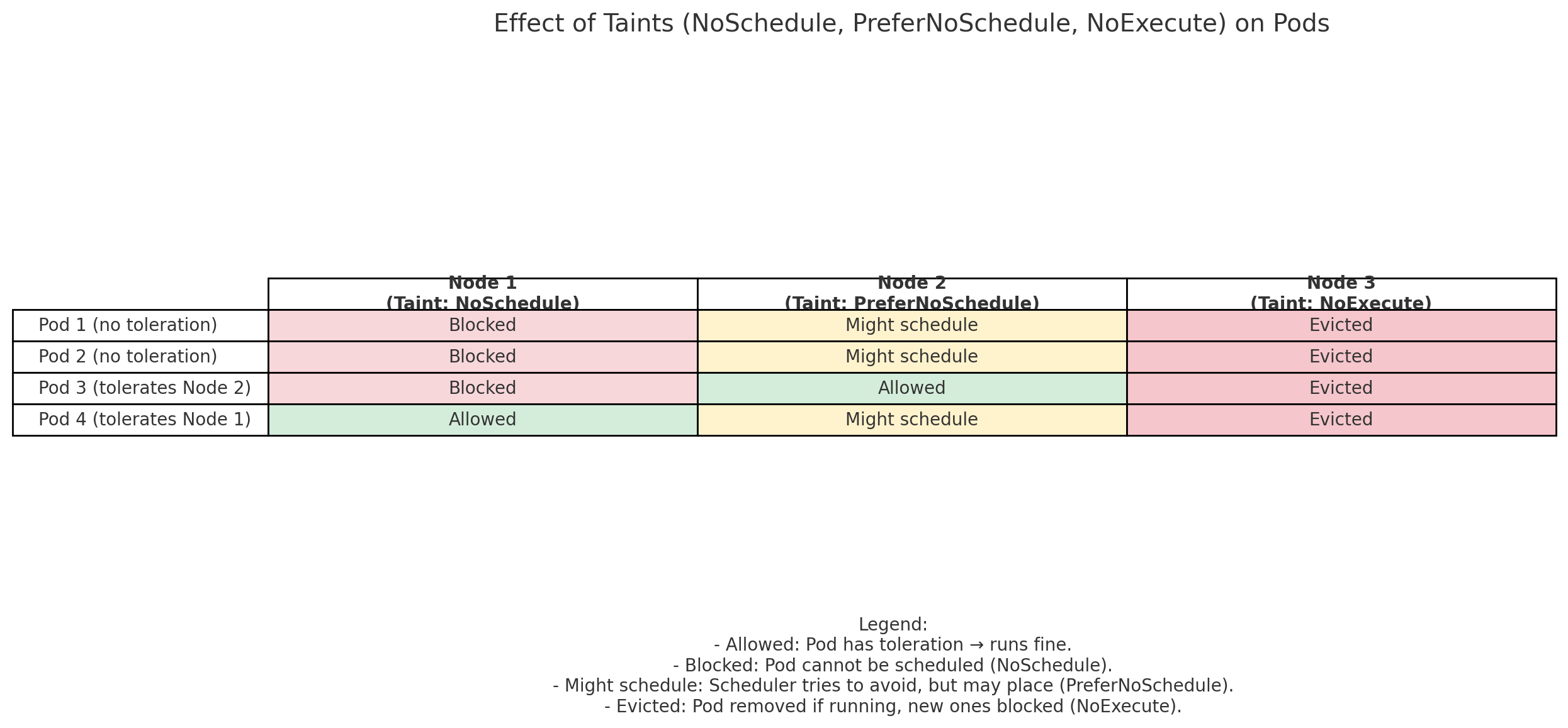
We now have 3 nodes, each with a different taint effect:
Nodes & Their Taints
- Node 1 – NoSchedule 👉 Pod without toleration ❌ won’t be scheduled.
- Node 2 – PreferNoSchedule 👉 Pod ⚠️ might still be scheduled if no better option.
- Node 3 – NoExecute 👉 Pod ⛔ is evicted if already running, and new ones are blocked.
Pods in This Scenario
- Pod 1 → no toleration
- Pod 2 → no toleration
- Pod 3 → tolerates Node 2’s taint
- Pod 4 → tolerates Node 1’s taint
Taint Syntax
Taint Example
| Add a Taint to Node1 | |
|---|---|
Tolerations example
| Tolerations for the pod | |
|---|---|
Note
Remember, all of these values inside tolerations need to be encoded in double quotes.
Master Node Taints
-
Master nodes can technically run Pods like worker nodes, but by default the scheduler avoids them.
This is because a taint is automatically applied to master nodes when the cluster is first set up. -
You can view or modify this taint if needed, but best practice is not to run application workloads on master nodes.
Remove a Taint from a Node
-
To remove a taint from a node in Kubernetes, you append a
-at the end of the taint specification. -
For example, to remove the NoSchedule taint from the
controlplanenode, run:
| Remove NoSchedule Taint from controlplane | |
|---|---|